# Quickly launch an Azure AKS Cluster
> Effortlessly launch and manage Azure AKS clusters for your Kubernetes workloads with simple commands and streamlined setup.
- Canonical: https://www.russ.cloud/2019/08/31/quickly-launch-an-azure-aks-cluster/
- Published: 2019-08-31
- Author: Russ McKendrick
- Tags: Azure, Kubernetes
---
Over the next few weeks, I am planning on doing some work which requires me to spin up and teardown several small Kubernetes clusters.
As I have access to an Azure Subscription and Microsoft have made the process of launching a cluster quite a painless experience I thought it would make sense to write a quick blog post to cover launching, configuring and tearing down an Azure AKS Cluster.
To start with I prefer to set a few environment variables on the command-line for things such and the resource name which are repeated through of the commands I need to run;
```bash frame="terminal" title="Quickly launch an Azure AKS Cluster 1/11"
$ AKSLOCATION=uksouth$ AKSRG=quick-cluster-rg $ AKSCLUSTER=quick-cluster-aks $ AKSNUMNODES=2
```
Once that the environment variables have been configured, using the same terminal window, we can create the resource group using the following command;
```bash frame="terminal" title="Quickly launch an Azure AKS Cluster 2/11"
$ az group create --name $AKSRG --location $AKSLOCATION
```
It should only take a few seconds to create the group. Now that the resource group is present we can then launch the AKS cluster, to do this use the following command;
```bash frame="terminal" title="Quickly launch an Azure AKS Cluster 3/11"
$ az aks create \ --resource-group $AKSRG \ --name $AKSCLUSTER \ --node-count $AKSNUMNODES \ --enable-addons monitoring \ --generate-ssh-keys
```
As you may have guessed this launches and configures a cluster with the number of nodes which we defined in the `$AKSNUMNODES` environment variable. The process takes several minutes.
Once complete, the next step is to configure our local client to communicate with the newly launched cluster. The first thing you may need to do is install the client itself, luckily Microsoft has made this a simple process, and you can just run the following command;
```bash frame="terminal" title="Quickly launch an Azure AKS Cluster 4/11"
$ az aks install-cli
```
Once installed you can run `kubectl version` to get confirmation that the agent is installed, don't worry if you see an error about connecting to the cluster, we haven't gotten that far yet.
Now with the client installed we need to grab the credentials needed to connect to our ASK cluster, again, this is quite a simple process, just run;
```bash frame="terminal" title="Quickly launch an Azure AKS Cluster 5/11"
$ az aks get-credentials --resource-group $AKSRG --name $AKSCLUSTER
```
Once the connection details have been imported running the following command;
```bash frame="terminal" title="Quickly launch an Azure AKS Cluster 6/11"
$ kubectl get nodes
```
Should show that you have two nodes in your cluster;
 Also, you should be able to see the cluster in the [Azure Portal](https://portal.azure.com/);
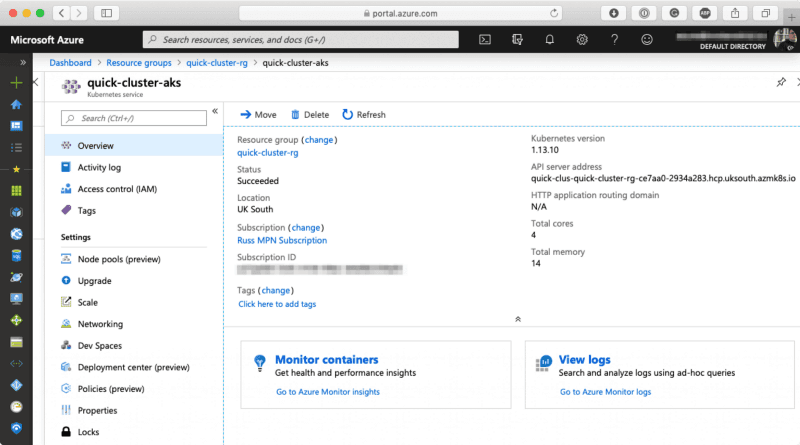 To tear down the cluster, return to the command-line and if needed re-enter just the `AKSRG` and `AKSCLUSTER` environment variables;
```bash frame="terminal" title="Quickly launch an Azure AKS Cluster 7/11"
$ AKSRG=quick-cluster-rg$ AKSCLUSTER=quick-cluster-aks
```
Now Running the command below will prompt if you want to delete the cluster;
```bash frame="terminal" title="Quickly launch an Azure AKS Cluster 8/11"
$ az aks delete \ --resource-group $AKSRG \ --name $AKSCLUSTER
```
It is possible to add `--yes` to the command to skip the prompt; however, it is always best to check just in case you end up removing the wrong cluster;
To tear down the cluster, return to the command-line and if needed re-enter just the `AKSRG` and `AKSCLUSTER` environment variables;
```bash frame="terminal" title="Quickly launch an Azure AKS Cluster 7/11"
$ AKSRG=quick-cluster-rg$ AKSCLUSTER=quick-cluster-aks
```
Now Running the command below will prompt if you want to delete the cluster;
```bash frame="terminal" title="Quickly launch an Azure AKS Cluster 8/11"
$ az aks delete \ --resource-group $AKSRG \ --name $AKSCLUSTER
```
It is possible to add `--yes` to the command to skip the prompt; however, it is always best to check just in case you end up removing the wrong cluster;
 The final Azure resource to remove will the resource group, to do this run;
```bash frame="terminal" title="Quickly launch an Azure AKS Cluster 9/11"
$ az group delete --name $AKSRG
```
Now that the Azure resources have been removed that just leaves us with our local configuration to tidy up. You can remove the cluster and context from your local configuration by running;
```bash frame="terminal" title="Quickly launch an Azure AKS Cluster 10/11"
$ kubectl config delete-cluster $AKSCLUSTER $ kubectl config delete-context $AKSCLUSTER
```
To check that have been removed you can run;
```bash frame="terminal" title="Quickly launch an Azure AKS Cluster 11/11"
$ kubectl config get-contexts$ kubectl config get-clusters
```
There you have it, with three commands you quickly spin up an X node Kubernetes cluster within Azure with little effort.
The final Azure resource to remove will the resource group, to do this run;
```bash frame="terminal" title="Quickly launch an Azure AKS Cluster 9/11"
$ az group delete --name $AKSRG
```
Now that the Azure resources have been removed that just leaves us with our local configuration to tidy up. You can remove the cluster and context from your local configuration by running;
```bash frame="terminal" title="Quickly launch an Azure AKS Cluster 10/11"
$ kubectl config delete-cluster $AKSCLUSTER $ kubectl config delete-context $AKSCLUSTER
```
To check that have been removed you can run;
```bash frame="terminal" title="Quickly launch an Azure AKS Cluster 11/11"
$ kubectl config get-contexts$ kubectl config get-clusters
```
There you have it, with three commands you quickly spin up an X node Kubernetes cluster within Azure with little effort.