Zsh Conda Environment Selector Function


Russ McKendrick · 2 min read ·
Managing Python environments can sometimes feel like navigating a jungle 🌴🐍, especially when dealing with dependency conflicts. To streamline this process, I created a handy Zsh function to add to your dotfile for switching Conda environments quickly and efficiently. 🚀 Let me walk you through it!
Why I Needed This Function 🛠️
After months of using Conda to manage Python environments on my macOS machines, I realized I had built up quite a collection. Switching between them manually became tedious. So, I decided to create a quick, interactive function to simplify the process. 🎯
How It Works 🔧
Here’s the magic in action ✨:
# Conda Select function with colors and stylingfunction cs() {    # Colors and formatting    local BLUE='\033[0;34m'    local GREEN='\033[0;32m'    local YELLOW='\033[1;33m'    local CYAN='\033[0;36m'    local BOLD='\033[1m'    local NC='\033[0m' # No Color
    # Get list of conda environments    local environments=($(conda env list | grep -v '^#' | awk '{print $1}' | grep -v '^$'))
    # Print header with styling    echo "\n${BOLD}${BLUE}🐍 Available Conda Environments:${NC}\n"
    # Print environments with numbers and colors    for i in {1..${#environments[@]}}; do        if [ "${environments[$i]}" = "base" ]; then            echo "  ${YELLOW}$i)${NC} ${CYAN}${environments[$i]}${NC} ${GREEN}(base)${NC}"        else            echo "  ${YELLOW}$i)${NC} ${CYAN}${environments[$i]}${NC}"        fi    done
    # Get user selection with styled prompt    echo "\n${BOLD}${BLUE}Enter environment number (${GREEN}1-${#environments[@]}${BLUE}):${NC} "    read selection
    # Validate input    if [[ "$selection" =~ ^[0-9]+$ ]] && [ "$selection" -ge 1 ] && [ "$selection" -le "${#environments[@]}" ]; then        echo "${GREEN}✓ Activating ${CYAN}${environments[$selection]}${GREEN} environment...${NC}"        conda activate "${environments[$selection]}"    else        echo "${YELLOW}⚠️  Invalid selection${NC}"    fi}
Using the Function ⚡
Running the cs command brings up a list of your Conda environments with some stylish colors and formatting. 🎨 All you have to do is pick a number, and the script takes care of the rest!
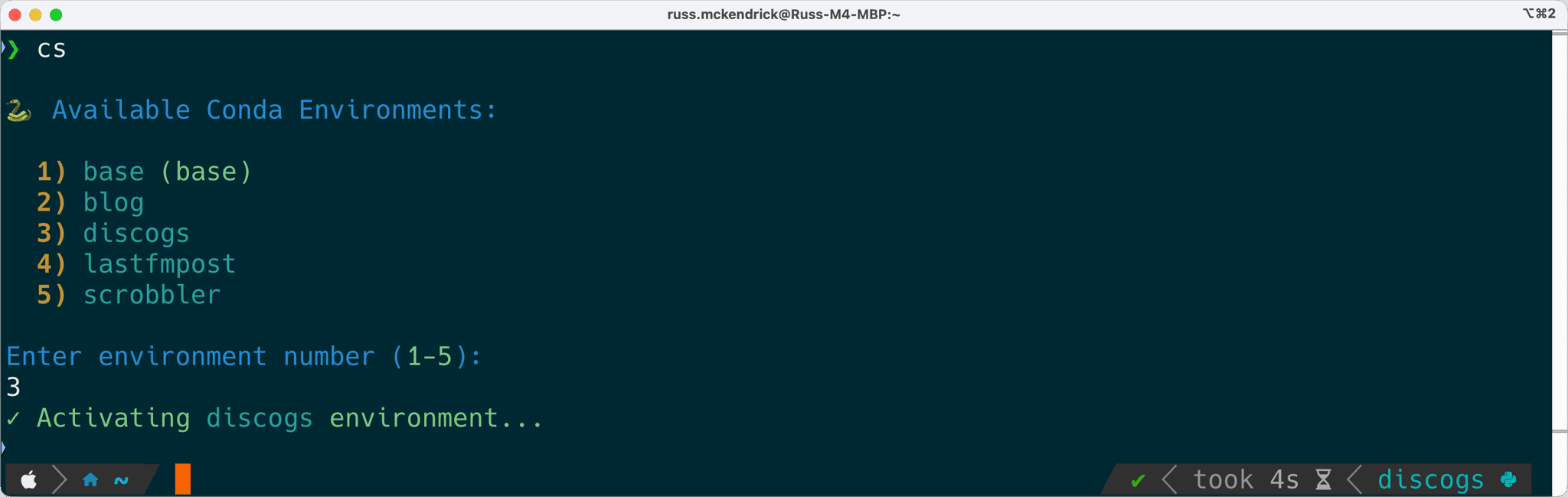
And there you have it! A quick and stylish way to manage your Python environments in Zsh 🐍. Have fun coding and keep your workflows clean and efficient! 🚀✨
Related terms: AgentAI Coding AssistantApplication Programming InterfaceClaude CodeCodexCommand-Line Interface
More from the archive
My Starship Prompt Revisited: Making Blocks Vanish Cleanly
A follow-up to my Starship setup: how I got the status and AI blocks to appear only when they matter, without leaving a powerline stub behind.
10 min read

Counting the Cost of Vibe Coding
A local-first dashboard for tracking AI coding tool spend across Claude Code, Codex, Cursor, Copilot, and Gemini CLI - with a TUI, a desktop app, and zero API keys required.
16 min read

Comments