# codebase-memory-mcp: Giving Claude Code (and Codex) a Map
> A short look at codebase-memory-mcp, an MCP server that indexes your codebase into a queryable knowledge graph so Claude Code or Codex can answer structural questions without grepping every file.
- Canonical: https://www.russ.cloud/2026/05/10/codebase-memory-mcp-giving-claude-code-and-codex-a-map/
- Published: 2026-05-10
- Author: Russ McKendrick
- Tags: ai, code, tools
---
Anyone who has spent a few hours with Claude Code or Codex on a growing project will have watched the agent grep its way around the same files over and over. Ask it "what calls this function?" and you can almost see it picking through the codebase a directory at a time, burning tokens as it goes. It works, but it's not exactly elegant.
[codebase-memory-mcp](https://github.com/DeusData/codebase-memory-mcp) takes a different approach. It's an MCP server that parses your source with tree-sitter and indexes everything (functions, classes, call chains, even cross-service HTTP links) into a SQLite-backed knowledge graph. Your agent then queries the graph instead of grepping the filesystem.
## What it does
The README claims a 99.2% reduction in tokens for structural queries on a multi-service test project (~3,400 tokens via the graph versus ~412,000 via file-by-file exploration), and there's an [arXiv paper](https://arxiv.org/abs/2603.27277) backing the design with benchmarks across 31 real-world repositories: 83% answer quality, 10× fewer tokens, and 2.1× fewer tool calls than file-by-file exploration. I was sceptical, but after a couple of sessions on one of my own projects, I'm prepared to believe it.
It supports 66 languages - the usual suspects (Python, Go, TypeScript, Rust, Java, C/C++, C#, PHP, Ruby) plus a long tail that includes Zig, Elixir, OCaml, Haskell, and infrastructure formats like Dockerfile, Kubernetes manifests, and HCL. The Linux kernel (28M LOC, 75K files) gets indexed in three minutes on an M3 Pro, and most queries return in under a millisecond. 14 MCP tools cover indexing, call-path tracing, dead code detection, git-diff impact analysis, ADR management, and Cypher-like graph queries against the graph. REST routes from FastAPI, Gin, Express and friends are first-class graph nodes too, so you can match HTTP call sites to their handlers across services.
It's a single statically-linked binary written in C with no runtime dependencies, backed by SQLite in WAL mode. The cache lives at `~/.cache/codebase-memory-mcp/` and persists across restarts.
## Installation
The repo provides a one-liner installer that grabs the right pre-built binary for your platform, sorts macOS code signing, and registers the MCP server with whichever coding agents it can find. I went with the `--ui` variant, which bundles a graph visualisation frontend on top of the MCP server itself:
```bash frame="terminal" title="Install on macOS / Linux with the UI variant"
curl -fsSL https://raw.githubusercontent.com/DeusData/codebase-memory-mcp/main/install.sh | bash -s -- --ui
```
Windows users get a PowerShell equivalent (`install.ps1` from the same repo) - the [README's Quick Start](https://github.com/DeusData/codebase-memory-mcp#quick-start) has the three-line download-inspect-run sequence.
The script drops the binary into `~/.local/bin` and then runs `codebase-memory-mcp install` to wire it into any agents it detects. It auto-configures eleven of them out of the box (Claude Code, Codex CLI, Gemini CLI, Zed, OpenCode, Antigravity, Aider, KiloCode, VS Code, OpenClaw, and Kiro), adding MCP server entries, instruction files, skills, and pre-tool hooks where each agent supports them. In my case it picked up both Claude Code and Codex without me having to point at anything, and it'll warn you if `~/.local/bin` isn't on your PATH yet.
After it finishes, restart your coding agent. In Claude Code, `/mcp` will show `codebase-memory-mcp` in the list of available servers; in Codex, the new tools turn up on the next session.
## Indexing a project
Once it's connected, point your agent at a project:
```text frame="terminal" title="Index a project"
Index this project
```
The agent calls `index_repository` against your current directory. The first run does a full parse; after that, it's incremental, and only files whose content hashes have changed get re-parsed.
## Asking questions
Once the graph is built, the agent has something better than grep to reach for. The kind of questions that used to take a flurry of greps now resolve to a single tool call:
- "What calls `process_order`?"
- "Find all functions with no callers"
- "Show me the cross-service HTTP calls between the API and the worker"
Under the hood, those become `trace_call_path`, `search_graph`, and `query_graph` calls. Both Claude Code and Codex translate the natural language into the right tool without any extra prompting on my part.
Here it is answering a real one against this blog's repo:
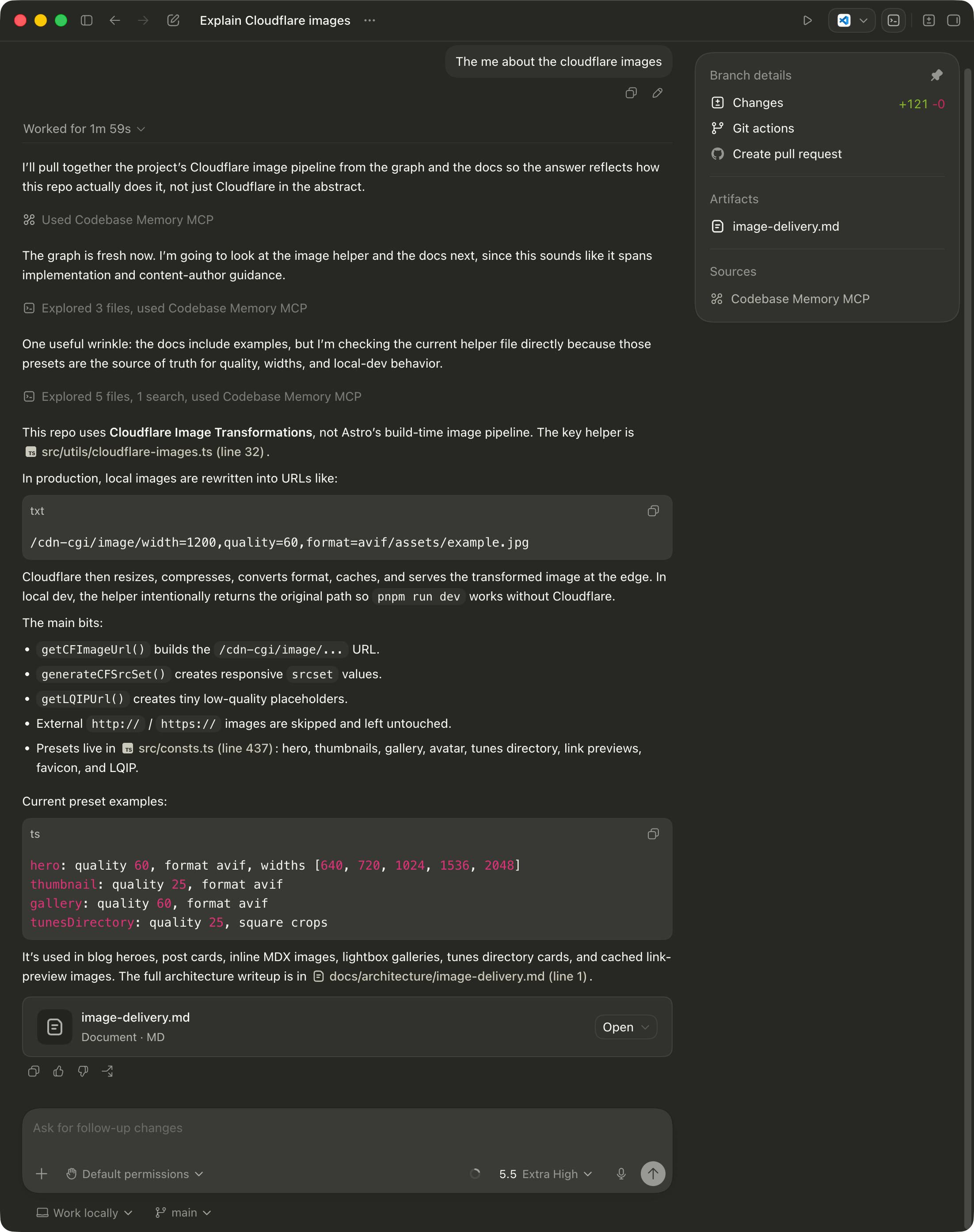 Behind that single prompt the agent ran one `search_graph` call (16 results, top hit `getCFImageUrl`), pulled the implementation with `get_code_snippet`, and skim-read a few of the related docs files. Total work for a question that would otherwise have been a parade of greps and reads: "Explored 5 files, 1 search". The summary it produced (this repo uses Cloudflare Image Transformations and the key helper is `src/utils/cloudflare-images.ts` at line 32) is the kind of concise, file-referenced answer I want from an agent, and the kind that's hard to get when it's forced to crawl the filesystem one read at a time.
For the curious, here's what that whole Codex session actually cost - pulled out of [Token Use](https://tokenuse.app), the dashboard I [wrote about last week](/2026/05/01/counting-the-cost-of-vibe-coding/):
Behind that single prompt the agent ran one `search_graph` call (16 results, top hit `getCFImageUrl`), pulled the implementation with `get_code_snippet`, and skim-read a few of the related docs files. Total work for a question that would otherwise have been a parade of greps and reads: "Explored 5 files, 1 search". The summary it produced (this repo uses Cloudflare Image Transformations and the key helper is `src/utils/cloudflare-images.ts` at line 32) is the kind of concise, file-referenced answer I want from an agent, and the kind that's hard to get when it's forced to crawl the filesystem one read at a time.
For the curious, here's what that whole Codex session actually cost - pulled out of [Token Use](https://tokenuse.app), the dashboard I [wrote about last week](/2026/05/01/counting-the-cost-of-vibe-coding/):
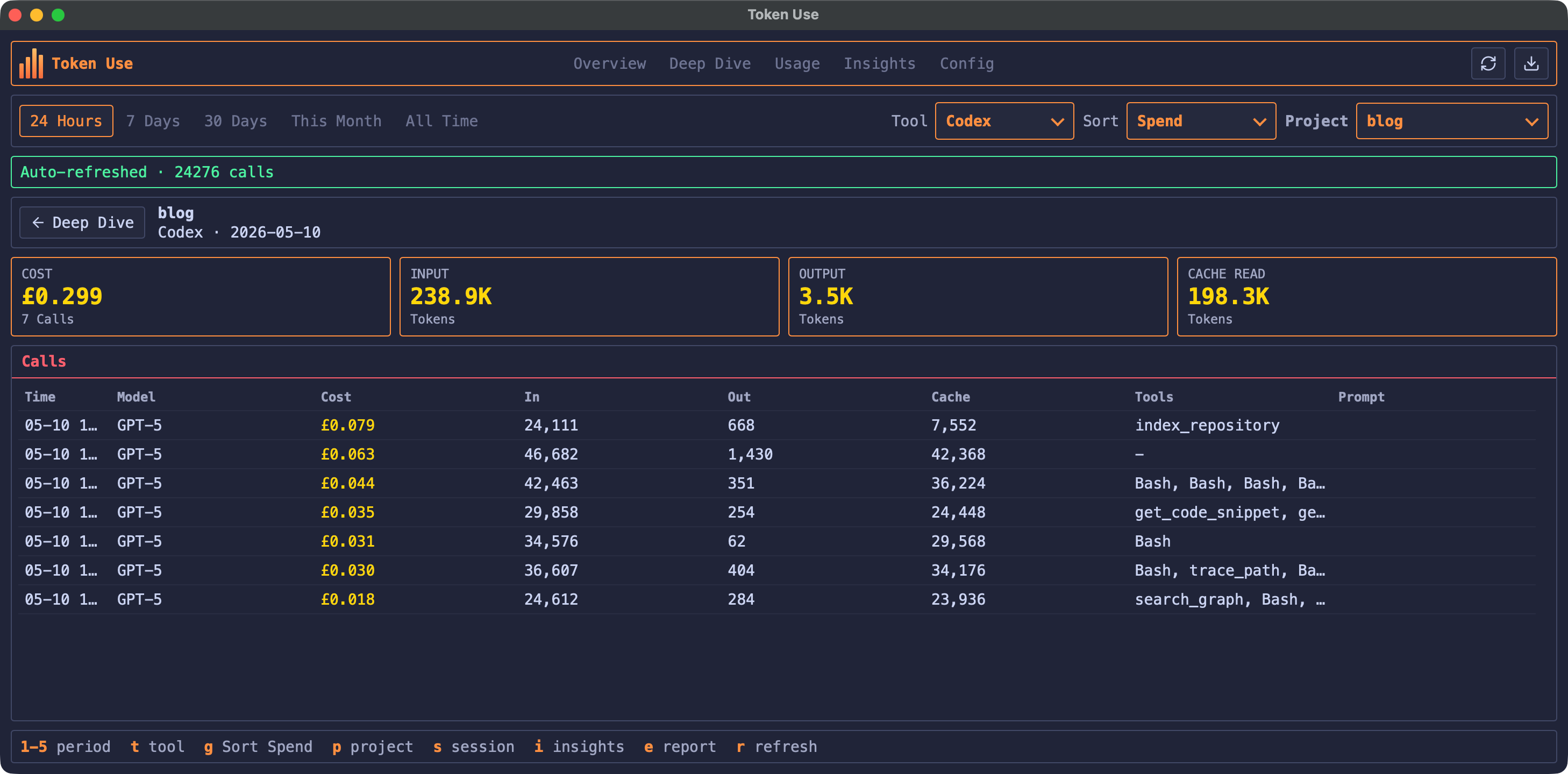 The whole session, including the one-off `index_repository` call upfront (the most expensive of the seven by some margin), came to £0.299 - call it 30p. The question-answering portion alone, once the index was in place, was about 22p across six smaller calls. The standout number is the cache reads: 198.3K of the 238.9K input tokens were served from cache, with the actual output a tiny 3.5K. Codex is doing very little talking and a lot of querying, which is precisely the shape you want.
## The graph UI
If you went with the `--ui` variant, the binary will also start a small web app on demand that lets you browse the indexed graph visually. Run it with the `--ui=true` flag and a port of your choosing:
```bash frame="terminal" title="Start the graph UI"
codebase-memory-mcp --ui=true --port=9749
```
Then point your browser at `http://localhost:9749`. Here's what it looks like for this blog:
The whole session, including the one-off `index_repository` call upfront (the most expensive of the seven by some margin), came to £0.299 - call it 30p. The question-answering portion alone, once the index was in place, was about 22p across six smaller calls. The standout number is the cache reads: 198.3K of the 238.9K input tokens were served from cache, with the actual output a tiny 3.5K. Codex is doing very little talking and a lot of querying, which is precisely the shape you want.
## The graph UI
If you went with the `--ui` variant, the binary will also start a small web app on demand that lets you browse the indexed graph visually. Run it with the `--ui=true` flag and a port of your choosing:
```bash frame="terminal" title="Start the graph UI"
codebase-memory-mcp --ui=true --port=9749
```
Then point your browser at `http://localhost:9749`. Here's what it looks like for this blog:
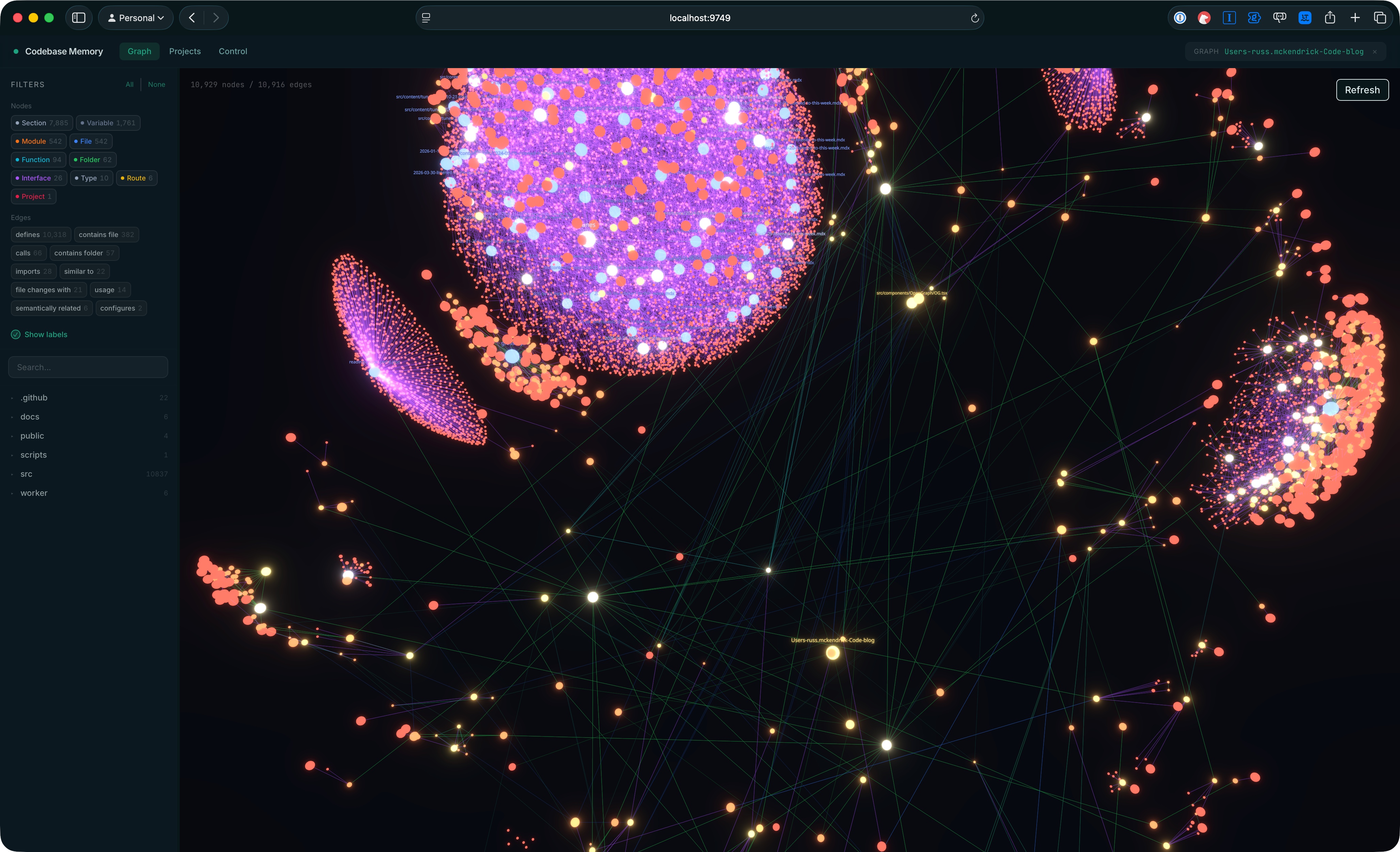 That's 10,929 nodes and 10,916 edges, which sounds like a lot until you remember Astro turns every MDX file into a tree of Section nodes (7,885 of them in my case, alongside 542 Files, 542 Modules, 94 Functions, and a handful of Routes). The sidebar filters by node label and edge type, you can search and click into individual nodes, and the whole thing lays itself out as a big force-directed graph that's quietly fun to poke around in.
I haven't reached for the UI much during day-to-day work - the value flows through the agent - but it's useful as a sanity check on what the indexer has actually picked up, and it makes for a decent screensaver if someone is looking over your shoulder.
## Teaching your agent to actually use it
One thing the README is upfront about: without a hint, agents will sometimes default to grep and Read for code questions even with the MCP server connected. The good news is that `install` handles this for you - it adds skills, instruction blocks, and pre-tool hooks for whichever agents it detects, and those nudge the agent toward graph queries for structural questions rather than letting it reach for grep out of habit.
If you want to know what kind of guidance gets added - or you're using an agent that isn't on the auto-config list and want to roll your own - here's a sensible starting block. Drop it into `~/.claude/CLAUDE.md` for Claude Code, or `~/.codex/AGENTS.md` for Codex:
```markdown frame="code" title="CLAUDE.md / AGENTS.md"
## Codebase Memory (codebase-memory-mcp)
When this MCP server is available, **prefer graph tools over grep/Explore for structural code questions**.
Graph queries return precise results in a single tool call (~500 tokens) vs file-by-file exploration (~80K tokens).
- **Before exploration/planning**: Run `index_repository` to ensure the graph is current
- **"Who calls X?"**: `trace_call_path(function_name="X", direction="inbound")`
- **"What does X call?"**: `trace_call_path(function_name="X", direction="outbound")`
- **Find functions by pattern**: `search_graph(label="Function", name_pattern=".*Pattern.*")`
- **Dead code**: `search_graph(label="Function", relationship="CALLS", direction="inbound", max_degree=0, exclude_entry_points=true)`
- **Cross-service calls**: `search_graph(relationship="HTTP_CALLS")` or `query_graph` with Cypher
- **REST routes**: `search_graph(label="Route")`
- **Understand structure first**: `get_graph_schema` before writing complex queries
- **Read source**: `get_code_snippet(qualified_name="...")` after finding functions via search
- **Complex patterns**: `query_graph` with Cypher for multi-hop graph traversals
Use grep/Glob for text search (string literals, error messages, config values) - the graph doesn't index text content.
```
I dropped this into my global `CLAUDE.md` and `~/.codex/AGENTS.md`, and the difference is noticeable in both. The agent leans on `trace_call_path` and `search_graph` for anything structural, and falls back to grep only for text content the graph doesn't index, like string literals or error messages.
## A few caveats
The graph indexes structure, not text content, so don't expect it to find that one config string you misspelt three months ago - that's still grep territory. The recommended block above is explicit about this, which is why the agent will still happily reach for grep when it's the right tool for the job.
That said, for the "where is this used?" and "what's actually dead?" questions that come up constantly when refactoring, it's quietly become part of my default setup in both Claude Code and Codex.
## Worth a try?
If you're using Claude Code or Codex on anything bigger than a single-file script and you've felt the friction of the agent re-reading the same files for the same questions, this is worth ten minutes of your time. The install is painless thanks to the script doing the agent configuration for you, and once a project is indexed the token savings on structural queries are substantial enough to notice on the bill at the end of the month.
That's 10,929 nodes and 10,916 edges, which sounds like a lot until you remember Astro turns every MDX file into a tree of Section nodes (7,885 of them in my case, alongside 542 Files, 542 Modules, 94 Functions, and a handful of Routes). The sidebar filters by node label and edge type, you can search and click into individual nodes, and the whole thing lays itself out as a big force-directed graph that's quietly fun to poke around in.
I haven't reached for the UI much during day-to-day work - the value flows through the agent - but it's useful as a sanity check on what the indexer has actually picked up, and it makes for a decent screensaver if someone is looking over your shoulder.
## Teaching your agent to actually use it
One thing the README is upfront about: without a hint, agents will sometimes default to grep and Read for code questions even with the MCP server connected. The good news is that `install` handles this for you - it adds skills, instruction blocks, and pre-tool hooks for whichever agents it detects, and those nudge the agent toward graph queries for structural questions rather than letting it reach for grep out of habit.
If you want to know what kind of guidance gets added - or you're using an agent that isn't on the auto-config list and want to roll your own - here's a sensible starting block. Drop it into `~/.claude/CLAUDE.md` for Claude Code, or `~/.codex/AGENTS.md` for Codex:
```markdown frame="code" title="CLAUDE.md / AGENTS.md"
## Codebase Memory (codebase-memory-mcp)
When this MCP server is available, **prefer graph tools over grep/Explore for structural code questions**.
Graph queries return precise results in a single tool call (~500 tokens) vs file-by-file exploration (~80K tokens).
- **Before exploration/planning**: Run `index_repository` to ensure the graph is current
- **"Who calls X?"**: `trace_call_path(function_name="X", direction="inbound")`
- **"What does X call?"**: `trace_call_path(function_name="X", direction="outbound")`
- **Find functions by pattern**: `search_graph(label="Function", name_pattern=".*Pattern.*")`
- **Dead code**: `search_graph(label="Function", relationship="CALLS", direction="inbound", max_degree=0, exclude_entry_points=true)`
- **Cross-service calls**: `search_graph(relationship="HTTP_CALLS")` or `query_graph` with Cypher
- **REST routes**: `search_graph(label="Route")`
- **Understand structure first**: `get_graph_schema` before writing complex queries
- **Read source**: `get_code_snippet(qualified_name="...")` after finding functions via search
- **Complex patterns**: `query_graph` with Cypher for multi-hop graph traversals
Use grep/Glob for text search (string literals, error messages, config values) - the graph doesn't index text content.
```
I dropped this into my global `CLAUDE.md` and `~/.codex/AGENTS.md`, and the difference is noticeable in both. The agent leans on `trace_call_path` and `search_graph` for anything structural, and falls back to grep only for text content the graph doesn't index, like string literals or error messages.
## A few caveats
The graph indexes structure, not text content, so don't expect it to find that one config string you misspelt three months ago - that's still grep territory. The recommended block above is explicit about this, which is why the agent will still happily reach for grep when it's the right tool for the job.
That said, for the "where is this used?" and "what's actually dead?" questions that come up constantly when refactoring, it's quietly become part of my default setup in both Claude Code and Codex.
## Worth a try?
If you're using Claude Code or Codex on anything bigger than a single-file script and you've felt the friction of the agent re-reading the same files for the same questions, this is worth ten minutes of your time. The install is painless thanks to the script doing the agent configuration for you, and once a project is indexed the token savings on structural queries are substantial enough to notice on the bill at the end of the month.