AI Commit Meets Apple's On-Device Model

macOS 27 ships with an fm CLI for Apple's on-device Foundation Model, so I added it to AI Commit as a provider, 8,192-token context window and all.

Russ McKendrick · · 12 min read
After upgrading to macOS 27, I typed fm into a terminal more or less by accident and got back a help screen with a rather nice ASCII-art Apple Intelligence logo and a list of commands. It turns out Apple now ships a command-line tool for its Foundation Models framework, pre-installed, with an on-device model sitting behind it. No API key and no per-token bill.
My first thought was the obvious one. AI Commit already talks to OpenAI, Anthropic, Groq, Ollama and a handful of local CLIs, so could aic use this too? The short answer is yes, and as of v0.0.10 there’s a new experimental apple provider. The longer answer involves an 8,192-token context window and a small model that needed some help following instructions, plus a streaming gotcha along the way. And then it tried to write the commit message for this very post.
What is fm?
Apple covered it in the WWDC26 session “Build AI-powered scripts with the fm CLI and Python SDK”. The pitch is that you can prompt the same models your Swift apps would use, straight from a terminal or a shell script, without rebuilding anything in Xcode.
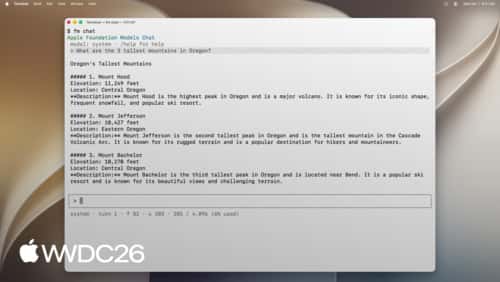
The commands are about what you’d expect:
fm available # is the model ready on this Mac?fm respond # one-shot prompt, ideal for scriptingfm chat # interactive sessionfm count-tokens # count tokens for a prompt or instructionsfm schema # build a schema for structured outputfm serve # start a Chat Completions API serverfm respond is the interesting one for scripting. It reads a prompt from an argument or stdin, takes separate system instructions with -i, and can be pointed at a JSON schema for structured output. The session also shows a --model pcc option for the larger Private Cloud Compute model. On my Mac (macOS 27.0.1) the only model fm will accept is system, the on-device one, so everything below uses that. There’s a Python SDK as well (pip install apple_fm_sdk), which I haven’t touched yet.
First attempt: fm serve
fm serve starts a local server with OpenAI-style /v1/models and /v1/chat/completions endpoints, and AI Commit’s openai provider already accepts a custom URL. So in theory, this should have just worked:
fm serve --port 1976AIC_AI_PROVIDER=openai AIC_API_URL=http://localhost:1976/v1 \ AIC_API_KEY=dummy AIC_MODEL=system aic --dry-runIt connected, the model generated a reply, and then aic fell over with expected value at line 1 column 1. The response was a stream of server-sent events rather than a single JSON body.
That’s a one-line fix in the request payload. The other two problems took more thought.
The two real problems
The context window is small. I bisected it with real source files and fm count-tokens. A 7,710-token prompt went through, while 8,361 tokens came back with The session's transcript exceeded the model's context size. That lines up with an 8,192-token window, and it covers the whole exchange, including the instructions and the response. For comparison, aic defaults to a 128,000-token input budget, and one of my own recent commits was about 18,000 tokens of diff on its own.
It doesn’t follow formatting rules very well. I fed it a real diff (a change to the WinGet workflow) with AI Commit’s system prompt as the instructions, and it came back with this:
**🛠️ fix: prevent stale fork from breaking winget sync**The summary itself is fine, but it’s wrapped in Markdown bold and the emoji isn’t a gitmoji (the type should really have been ci, too). For a model small enough to run on a laptop in a couple of seconds, that’s not a surprise, but it’s not something I’d want committed either.
Going with fm respond instead
Once I’d fixed the streaming issue, I had a choice between an fm serve preset and wrapping fm respond directly. I went with fm respond. It means nobody has to remember to keep a server running, and it slots in next to the existing claude-code, codex and copilot providers, which already shell out to a local binary.
Those existing CLI providers flatten the whole conversation into one prompt and pipe it over stdin. That works well for big models, but AI Commit’s commit prompt includes a few-shot example (an example diff and the commit message I’d expect for it), and I suspected a small model would struggle to untangle that from the real diff. So the apple provider does it differently: the system prompt and the example go in through -i, and only the staged diff goes over stdin. Under the hood, aic is running this:
fm respond --no-stream --greedy \ --guardrails permissive-content-transformations \ -i "<system prompt + example exchange>" < staged.diff--greedy is the closest match to the temperature of 0 that aic uses with the HTTP providers. The permissive-content-transformations guardrail level is Apple’s setting for transforming text you’ve supplied, which is what summarising a diff is.
Moving the example into the instructions made a bigger difference than I expected. Here’s the same WinGet diff again:
🐛 fix(ci): prevent stale fork from breaking winget sync
- Ensure environment variables are properly injected into workflow steps- Replace manual fork sync error handling with automated detection and recovery- Harden sync logic to fail fast on stale forks while preserving upstream integrity
That’s a proper gitmoji with a scope, and no stray Markdown. I’d still have called it ci rather than fix, but I’d accept that one without editing it. It took 2.6 seconds, entirely on the machine.
Working around the context window
For the context window, aic caps AIC_TOKENS_MAX_INPUT at 6,000 when the provider is apple. That might look overly cautious against an 8,192-token limit, but aic counts tokens with OpenAI’s cl100k tokeniser, and when I compared the two, Apple’s came out 20-25% higher on Rust source and diffs. The cap only applies when the config is loaded, so it never gets written back to your config file, and if you’ve set a lower value yourself, that one wins.
With the cap in place, larger diffs go through the same chunking path every other provider uses, where aic summarises the diff a chunk at a time and then combines those summaries into one message. If the model still runs out of room, aic now reports that clearly and suggests lowering the limit, rather than passing on a raw error from fm.
I tested that on the 21-file commit that had blown the context window earlier. It went through in 25 seconds without a single context error, but the message was wrong. The real commit was a round of terminal UI changes, and the generated message was about diff splitting and caching the token counter. At the time, I put that down to the release notes file in the diff, which does mention both. It turned out to be something more embarrassing, which I found out the hard way.
Then it tried to commit this post
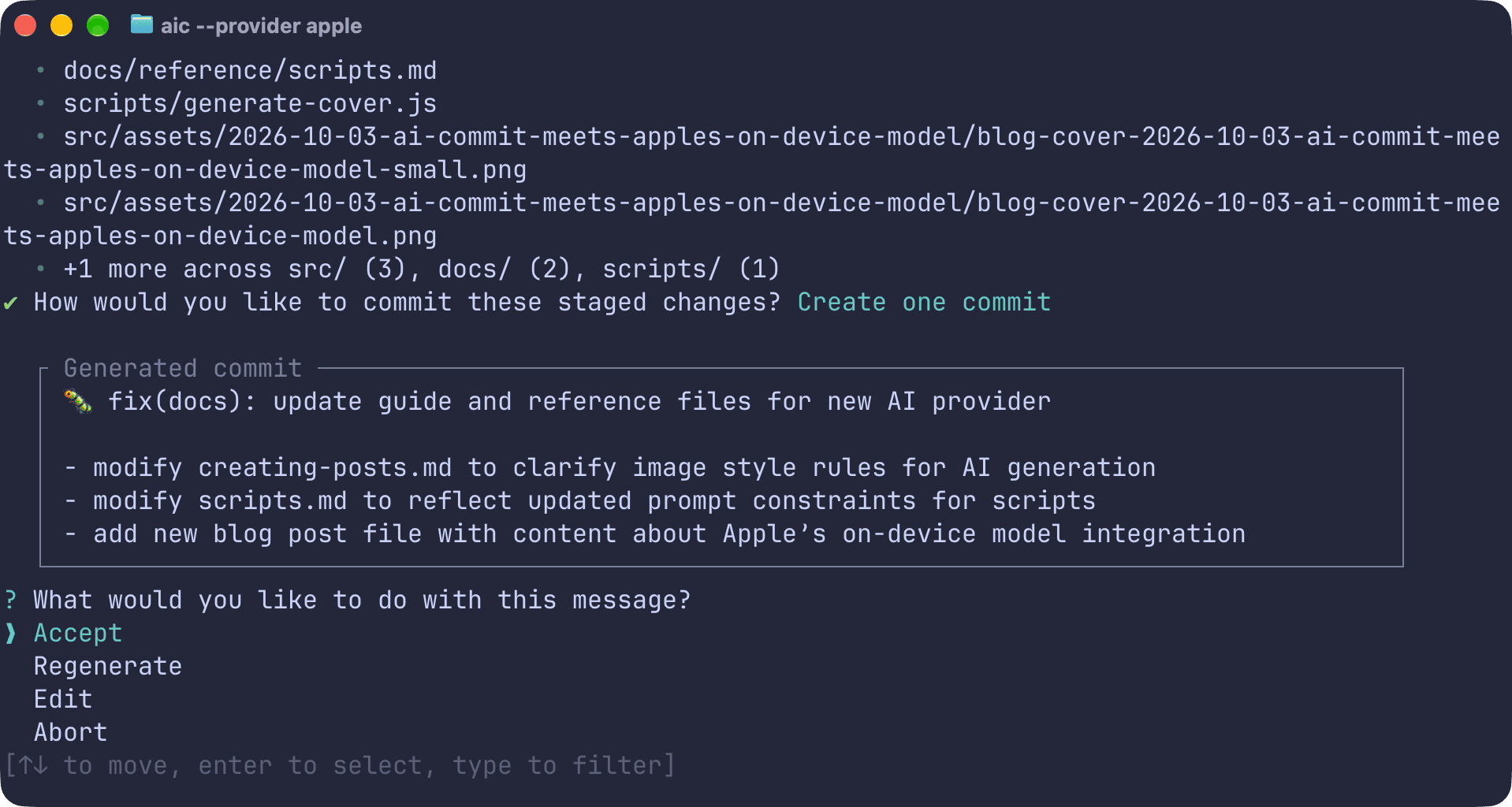
Naturally, the first real thing I used it for was committing this post. Staged were the post itself and a tweak to the script that generates my cover images, along with its docs. Here’s what came back:
🐛 fix(diff): prevent oversized diffs from breaking commit generation
- Split large diff chunks into manageable summaries before combining them- Apply a 6,000-token input cap for Apple's `fm` provider to avoid context errors- Use `--no-stream` and explicit guardrails to ensure clean output for small fixes
None of that happened in this commit. It is, however, a fairly accurate summary of this post.
To see what was going on, I swapped in a fake fm that wrote its arguments and stdin to a file, then replayed the captured prompt against the real thing with a few variations. It turned up two problems.
The first one was mine. AI Commit’s default system prompt includes a couple of example commit messages to show the style I’m after, and both happen to be about aic’s own diff handling. One of them is 🐛 fix(diff): prevent oversized staged changes from aborting commits. Compare that with the subject above. The small model wasn’t using the examples as a guide, it was copying them, and that also explains the 21-file result from earlier, which came back as prevent oversized staged changes from halting commit generation. The release notes had nothing to do with it.
The second was the post itself. It accounted for 143 of the 172 added lines, so the model did what you’d expect and summarised the text that dominated the diff, treating what the post says as things the commit had done.
Fixing either one on its own wasn’t enough. Without the examples, it stopped copying them but went back to describing the post. Trimming the diff while leaving the examples in changed nothing at all. So the apple provider now gets its own treatment:
- A much shorter prompt template with no style examples, plus an explicit rule that the text inside an added file is that file’s content and shouldn’t be described as changes made by the commit.
- The diff starts with an outline of the staged files (added or modified, with line counts), and any added Markdown or text file longer than 40 lines is trimmed to its first 20, which is usually enough for the frontmatter and opening paragraph.
- The output gets tidied after generation. Stray code fences and Markdown bold are stripped and a missing blank line after the subject is put back. A mismatched gitmoji like
✨ docs:also becomes📝 docs:.
Here’s the same commit again:
📝 docs: update guides and scripts with new content and formatting
- Add blog post about Apple's on-device model and AI Commit integration- Update creating-posts.md with revised creative guidelines for image generation- Modify scripts.md to reflect new output rules and styling constraints- Refine generate-cover.js logic to enforce real-world analogies over tech imagery
The subject is still a bit generic (I’d have led with the post), but every line is now about something that’s actually in the commit. The 21-file commit isn’t fixed by any of this. It now comes back as a vague docs change, which is still wrong, just less confidently so. I re-rolled v0.0.10 with the fix before its WinGet package had been merged, so if you install it now, you’ll get the fixed version.
Using it
You’ll need a Mac with Apple Intelligence enabled. Before fm will do anything useful, you have to accept Apple’s licence by running sudo fm license, which walks you through it. Once that’s done, check the model is ready, upgrade aic, and switch providers:
sudo fm licensefm availablebrew upgrade russmckendrick/tap/aicommitaic config set AIC_AI_PROVIDER=apple AIC_MODEL=defaultOr keep your usual provider and try it for a single run:
aic --provider appleaic review --provider fmfm works as an alias for apple, and aic models --provider apple will tell you what it’s using and the token cap. It also works for aic review, which came back with sensible findings for the small WinGet change.
Also in v0.0.10
The same release refreshes every Rust dependency, including reqwest 0.13, tiktoken-rs 0.12, toml_edit 0.25 and termimad 0.35. The visible change from that is how HTTPS certificates get checked. reqwest 0.13 asks the operating system’s trust store directly using the platform verifier, so corporate and custom CA roots carry on working, and on macOS and Windows the OS’s own trust policy applies too. The trade-off is a slightly bigger binary, about 2MB, thanks to the new crypto library.
Summary
I didn’t expect a pre-installed macOS command to end up as an AI Commit provider, but most of the work turned out to be adjusting aic to suit a smaller model rather than wiring anything new up. Splitting the prompt into instructions and input fixed the formatting, and capping the tokens took care of the context window. The lesson I didn’t expect was that a prompt tuned for a big hosted model can actively hurt a small one, which will happily copy your examples back to you word for word. What I can’t fix is the quality on big diffs, which is down to the size of the model rather than anything aic is doing.
For small commits, though, getting a decent message in a couple of seconds with nothing leaving the machine is a nice option to have, especially for repos you’d rather not send to a cloud API. If Private Cloud Compute turns up in fm on my Mac, that’ll be the next thing I try.
If you’ve got macOS 27 and Apple Intelligence switched on, run sudo fm license and then give it a go with aic --provider apple. And if you hit anything odd, issues and pull requests are welcome.

Related terms: AgentAgent SkillsAI Coding AssistantApplication Programming InterfaceClaude CodeCodex


Comments