Introducing AI Commit

A Rust CLI I built to stop writing terrible commit messages - aic generates AI-powered commit messages, PR drafts, diff reviews, and repo visualisations from your staged changes.

Russ McKendrick · · 10 min read
I’ll be honest: my commit messages have a history of being terrible. Not “wip” or “fix stuff” levels of terrible (usually), but certainly not the kind of clean, conventional, descriptive messages that make a project’s history useful six months later. I’d write something passable and move on, telling myself I’d go back and clean things up before opening the PR. I never did.
So I used AI to build an AI tool to fix that. AI Commit is a Rust CLI that reads your staged diff and generates a commit message for you. The binary is aic, it supports several AI providers including local ones, and it’s been in daily use here since the early builds.
Built with AI, for AI-assisted git
Like ssl-toolkit and HostsButler before it, AI Commit was vibe-coded in Rust using Claude Code and Codex. I’m not a Rust developer by trade - my background is infrastructure and DevOps - but tools like Claude Code have made it practical for me to build and maintain projects in a language I wouldn’t otherwise have reached for.
There’s an obvious meta quality to building an AI-powered tool with an AI coding assistant, and I won’t pretend that wasn’t part of the appeal. But it’s also just how I work now. Claude Code handles the parts of Rust that would otherwise send me down documentation rabbit holes, and I get to focus on the design and behaviour of the thing rather than fighting the borrow checker.
If you’re curious about the vibe-coding workflow, I covered it in more detail in Doom or Vibe Coding.
What it does
The core loop is simple: stage your changes, run aic, review the generated message, and either accept it, ask for a regeneration, or drop into your editor to tweak it. The tool reads the diff, feeds it to whichever AI provider you’ve configured, and comes back with a conventional commit message - complete with a type, optional scope derived from your changed file paths, a description, and an explanatory body.
Beyond the basic commit flow, there are a few other commands worth knowing about:
aic review- runs your staged diff through a review-focused prompt and comes back with findings grouped by severity (Critical, Warning, Suggestion). Good for a sanity check before committing something you’re unsure about.aic pr- generates a pull request title and Markdown description from your branch’s commits and cumulative diff. I’ve been using this every time I open a PR.aic log- rewrites the last N commit messages on a branch using AI. Useful for cleaning up a scrappy local history before pushing.aic history- a local log of every generated message, review, and PR draft, browsable in an interactive picker.aic map- generates SVG visualisations of your codebase and commit history. More on this below.
Installation
On macOS, Homebrew is the easiest path:
brew install russmckendrick/tap/aicommitOn Linux, grab the binary directly - the following one-liner detects your architecture and installs it to /usr/local/bin:
ARCH=$(uname -m | sed 's/x86_64/amd64/;s/aarch64/arm64/')curl -sL "https://github.com/russmckendrick/aicommit/releases/latest/download/aic-linux-${ARCH}" -o aicchmod +x aicsudo mv aic /usr/local/bin/On Windows, download with PowerShell:
Invoke-WebRequest -Uri "https://github.com/russmckendrick/aicommit/releases/latest/download/aic-windows-amd64.exe" -OutFile "aic.exe"WinGet support is on the way - a PR has been submitted to the community repository and is currently in review. Once that’s merged you’ll be able to install with winget install --id RussMcKendrick.Aicommit -e.
All current releases are on the GitHub releases page.
Setup
Once installed, run the guided setup:
aic setupThis walks you through selecting a provider and configuring your API key. If you plan to use the claude-code or codex local providers, install and authenticate those CLIs first - aic will reuse their existing login state rather than managing credentials itself.
Providers
v0.0.6 ships with seven provider paths: openai, azure-openai, anthropic, groq, ollama, claude-code, and codex.
OpenAI, Azure OpenAI, Groq, and Ollama all use the standard chat completions wire format. Anthropic uses its Messages API directly. The claude-code and codex providers are a bit different - they talk to the locally installed claude or codex binary from your PATH, so authentication is handled by those tools rather than aic.
aic config set AIC_AI_PROVIDER=openai AIC_API_KEY=<key> AIC_MODEL=gpt-5.4-miniaic config set AIC_AI_PROVIDER=azure-openai AIC_API_KEY=<key> AIC_API_URL=https://<resource>.openai.azure.com/openai/v1 AIC_MODEL=<deployment-name>aic config set AIC_AI_PROVIDER=anthropic AIC_API_KEY=<key> AIC_MODEL=claude-sonnet-4-20250514aic config set AIC_AI_PROVIDER=groq AIC_API_KEY=<key> AIC_MODEL=llama-3.1-8b-instantaic config set AIC_AI_PROVIDER=ollama AIC_MODEL=llama3.2aic config set AIC_AI_PROVIDER=claude-code AIC_MODEL=defaultYou can also override the provider for a single run without touching your config:
aic --provider anthropicaic review --provider groqaic --provider ollamaaic --provider claude-codeaic review --provider codexAny OpenAI-compatible endpoint also works by setting AIC_API_URL alongside AIC_AI_PROVIDER=openai.
The basic workflow
Stage your files as normal, then run aic:
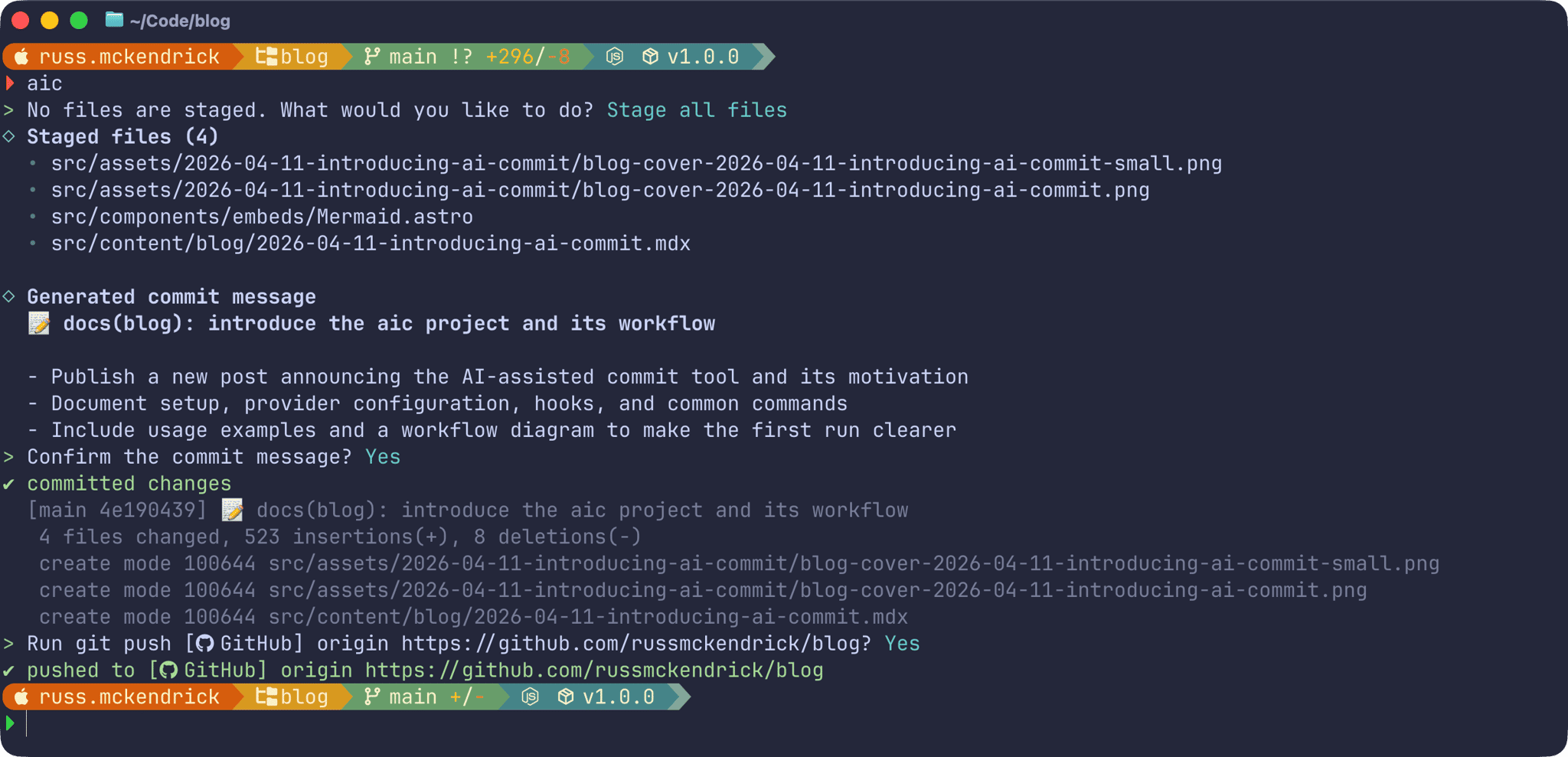
git add src/aicIf you haven’t staged anything, aic presents a menu to stage all changed files, pick files interactively, or bail out. Once it has a diff to work with, it generates a message and shows it to you for review - accept, regenerate, edit, or abort.
For a quick check of what it would generate without actually committing:
aic --dry-runAnd if you want to clean up the last commit:
aic --amendHere’s what committing and pushing this blog post looked like:
Splitting commits
When you’ve staged changes across several unrelated files, aic can split them into separate commits rather than lumping everything together. When at least two files are staged, the interactive flow will offer to split the change set:
git add .aicIf you choose to split, aic analyses the staged changes, suggests 2–4 file-based commit groups, generates a message for each one, and shows you a preview of the full sequence before creating anything. You can accept the suggested groups, rebuild them manually, or fall back to a single commit.
A few current limitations worth knowing: splitting is file-based rather than hunk-based, and it’s only available in the normal interactive flow - --yes, --dry-run, and --amend stay as single-commit operations.
Reviewing your diff before committing
I’ve started running aic review before committing anything I’m not completely confident about. It reads the staged diff and groups findings by severity:
aic reviewaic review --context "focus on security"Large diffs get chunked automatically and synthesised into a single review. It’s not a replacement for a proper code review, but it’s caught a few things I’d have missed.
Generating PR descriptions
Once you’ve got a branch ready to push, aic pr will generate a title and Markdown description based on the branch’s commits and diff against the base:
aic praic pr --base origin/mainaic pr --context "call out the migration risk"The base branch is detected automatically when possible (it checks refs/remotes/origin/HEAD, then origin/main, then main, then master), or you can specify it with --base. The output is copy-ready, and the draft gets saved to your local history.
Visualising your repo
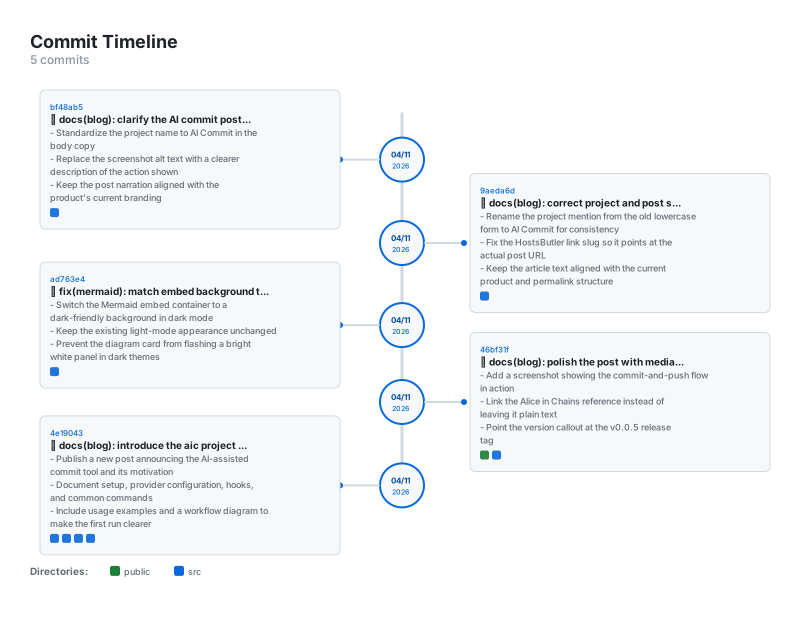
aic map generates standalone SVG visualisations of your codebase structure and commit history. There are four subcommands:
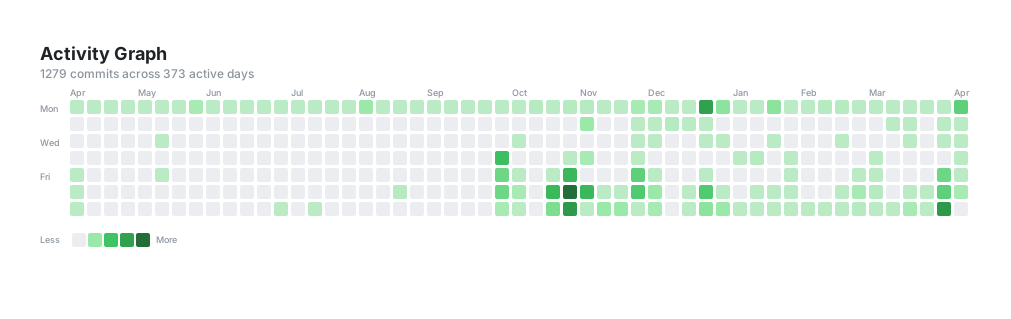
aic map tree # squarified treemap of the file hierarchy, sized by line countaic map history # vertical zigzag timeline of recent commitsaic map heat # bar chart of files sorted by modification frequencyaic map activity # GitHub-style contribution grid from commit timestampsAll four write standalone SVG files that open in any browser. You can control the commit range, output path, and colour theme:
aic map history -n 30 -o timeline.svgaic map heat -n 200aic map activity --theme draculaAvailable themes include github-light, github-dark, solarized-dark, monokai, and dracula, among others. If you want consistent defaults across a repo, drop a .aicommit-map file in the root:
theme = "dracula"history_commits = 30heat_commits = 100activity_commits = 1000Here are a couple of examples generated from this blog’s repository - an activity graph and a commit timeline:
Git hooks
If you’d rather have commit messages generated automatically every time you run git commit, you can install a prepare-commit-msg hook:
aic hook setBy default, the hook writes the generated message as a comment so you can review and uncomment it in your editor. If you want it written directly as the active message:
aic config set AIC_HOOK_AUTO_UNCOMMENT=trueTo remove the hook:
aic hook unsetConfiguration
Configuration lives in ~/.aicommit and follows a simple precedence: built-in defaults, then the global config file, then process environment variables. The aic config subcommand handles reading and writing:
aic config set AIC_MODEL=gpt-5.4-miniaic config get AIC_MODEL AIC_AI_PROVIDERaic config describeA couple of settings worth knowing about: AIC_EMOJI and AIC_DESCRIPTION both default to true, which means generated messages include an emoji prefix and a longer body. Turn them off if your project’s convention doesn’t use either. You can also point AIC_PROMPT_FILE at a custom prompt template if the default behaviour doesn’t suit your workflow.
For repositories with large generated files, lock files, or assets you don’t want included in the diff, add a .aicommitignore alongside your .gitignore:
**/*.lockdist/****/*.jpgSummary
aicommit has made me stop dreading the “write a good commit message” part of the workflow. And yes, the command being aic is an entirely deliberate Alice In Chains reference - if you’re going to type something dozens of times a day, it might as well be named after a great band. The project is open source and on GitHub:
It’s at v0.0.6 now, with commit splitting, repo visualisations, and native Anthropic, Groq, and Ollama support all landed in this release. There are still rough edges - config profiles and platform PR API integration are both on the roadmap. If you give it a go and hit anything odd, or have a feature you’d like to see, issues and pull requests are very welcome.