Playing with Headroom: Compressing the Context Going to My AI Coding Agents


Russ McKendrick · 11 min read ·
I spend real money on AI coding tools. Enough that I built Token Use to keep an eye on where it all goes across Claude Code, Codex, and the rest. So when a project turns up promising “60-95% fewer tokens, same answers,” it gets my attention, even if the part of me that has read a few too many README files starts squinting straightaway.
The project is Headroom, and I’ve been running it for a few days against my normal Claude Code workflow to see what those numbers actually look like once they hit my own usage rather than a benchmark. The short version: there are savings, they’re worth having, but almost none of them come from the bit the headline is selling. Let me walk through what I found.
What Headroom actually is
Headroom is a context-compression layer for AI agents. In practice that means a local proxy: it sits between your coding agent and the model provider, intercepts everything the agent reads on its way to the LLM, and tries to shrink it before forwarding. Tool outputs, build logs, JSON blobs, file reads, RAG chunks, and the growing conversation history all get inspected and, where it can, compressed.
It’s the work of Tejas Chopra, it’s Apache-2.0 licensed, and it’s mostly Python with a Rust core. It can run as a Python library, an MCP server, or the proxy I’ve been using. I went with the proxy because it needs no changes to how I work: point Claude Code at it and carry on.
The compression itself is the clever-sounding part. A content router sniffs each payload, works out what kind of data it is, and hands it to a matching compressor. Arrays of near-identical JSON get crushed down to a representative sample. Logs get de-duplicated. The original is kept locally so nothing is genuinely lost, and the model gets a headroom_retrieve tool it can call to pull the full version back if it actually needs it. That last detail is what separates this from just truncating output and hoping, and it’s the bit I liked most on paper.
Getting it running
Installation is a pip install and a handful of subcommands. The full extras pull in the ML models for the heavier text compression, which means a chunky first-run download, so be on a decent connection for the first go.
pip install "headroom-ai[all]"headroom tools installheadroom initheadroom init wires it into the agents it can find on your machine, registers its MCP retrieve tool with Claude Code and Codex, and tells you to restart them so the hooks take effect. From there, the way you run an agent through the proxy is headroom wrap:
headroom wrap claudeThat starts the proxy, points Claude Code’s API base URL at it, and launches Claude Code as normal. As far as the day-to-day goes, that’s it. You work exactly as before, and the proxy quietly does its thing in the background on port 8787.

The dashboard
The proxy serves a live dashboard at http://127.0.0.1:8787/dashboard, and it’s a nicely put-together thing. Proxy dollars saved, token-savings percentage, request overhead, a prefix-cache panel, and an Anthropic subscription-window tracker that watches your 5-hour and 7-day usage windows and the overage on top.
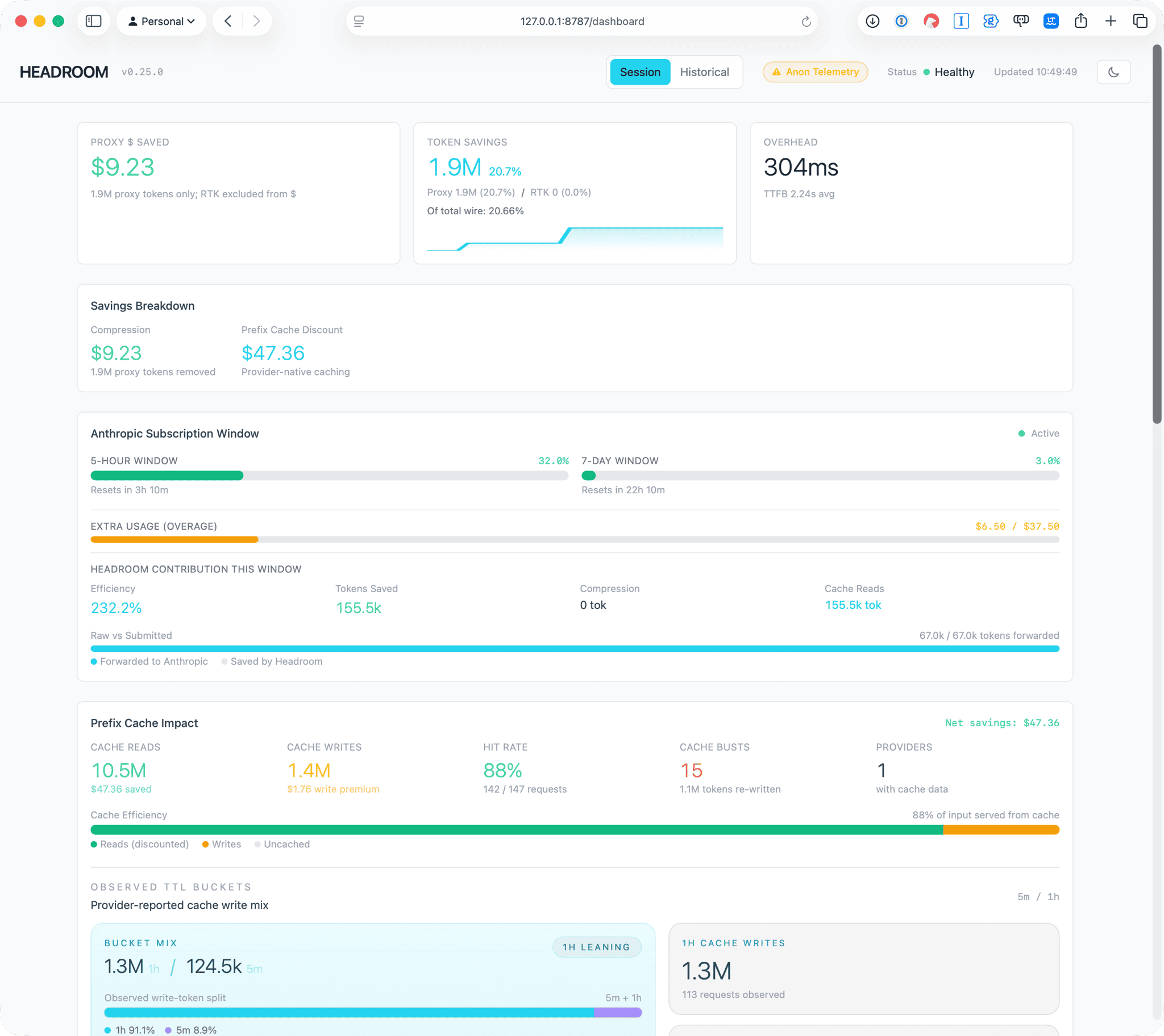
It’s the sort of dashboard that makes you feel like you’re getting away with something. After a few longer sessions mine was reporting 20.7% token savings on roughly 1.9 million tokens, $9.23 saved on compression, and $47.36 on top from the prefix cache. Fifty-odd dollars for the price of a pip install. Lovely.
Except that’s the number you stop reading at, and the interesting part is what happens when you don’t.
Reading the numbers properly
Two things are worth pulling apart here, because the headline figure quietly blends them.
The first is that the big dollar number isn’t really Headroom’s. That $47.36 is the prefix-cache discount, which is Anthropic’s own prompt caching doing its job: cached input tokens are billed at about a tenth of the normal rate, and over 10.5 million cache reads at an 88% hit rate that adds up fast. Headroom’s contribution here is to keep the prefix of each request byte-stable so the cache actually hits, which is a real and useful thing to do. But Claude Code already caches aggressively on its own, so most of that discount is money I’d have saved anyway. Crediting it to the proxy is generous accounting.
The second is more interesting, and you only see it if you run headroom perf, which breaks down where the savings came from.
Requests:     152Tokens:       8,956,380 -> 7,105,767 (20.7% reduction)Total saved:  1,850,613 tokens
Per-Model Breakdown----------------------------------------  claude-haiku-4-5: 34 reqs, 6,688 tokens saved (2%)    ~$0.01 at list price  claude-opus-4-8:  116 reqs, 1,843,925 tokens saved (22%)  ~$9.22 at list price  * Actual bill savings depend on provider caching behavior
Optimization Overhead----------------------------------------  Average:  304ms  Max:      24722ms  >500ms:   8 requests
Transform Effectiveness----------------------------------------  content_router: 0.8% avg reduction, 152 uses, 97,239 saved
Content Router Routing----------------------------------------  Compressed:  92 (2%)  Excluded:    1356 (28%) — Read/Glob outputs  Skipped:     3047 (63%) — <50 words  Unchanged:   311 (6%) — ratio too high
So the proxy reports 1.85 million tokens saved, and the actual content compressor (the clever JSON-and-logs router that’s the whole pitch) accounts for 97,239 of them. That’s about five percent of the saving. The rest is the proxy trimming stale conversation history on long sessions, which is a perfectly reasonable thing to do, but it’s not the headline feature. The dashboard files all of it under “compression,” and the perf breakdown is the more honest reading.
Look at the routing lines and it’s clear why. Sixty-three percent of what passed through was too short to bother with. Twenty-eight percent was Read and Glob output, which Headroom deliberately excludes. Only two percent actually got compressed. My sessions are mostly conversational back-and-forth and file reads, and that’s precisely the shape of work where the content compressor has the least to chew on. The tool even tells me so in its own recommendations, suggesting I let it compress stale Read outputs for a bigger win.
None of this is Headroom being broken. It’s Headroom being honest about a workload it isn’t ideally suited to. If I were running tool-heavy agents that hammer JSON APIs or wade through enormous log files, those compression numbers would look very different. For someone doing the kind of mixed coding-and-chatting I do, the compressor is a rounding error and the real saving is the history trimming plus a cache discount I mostly already had.
One more thing the dashboard glosses over: it isn’t free. The proxy adds about 300ms of overhead per request on average, with the occasional outlier into the tens of seconds while the ML text model warms up. Against the multi-second latency of an actual model response that’s mostly noise, but it’s not nothing, and it’s the kind of cost that doesn’t show up next to the dollar signs.
The bit I didn’t expect to like
The feature that earned its keep wasn’t the compression at all. It was headroom learn.
It reads back through your past agent sessions, the logs Claude Code and Codex leave behind, finds the places where the agent went wrong and correlates them with whatever eventually worked, and proposes corrections to write into your CLAUDE.md or AGENTS.md. It runs as a dry run by default and shows you exactly what it would add before touching anything.
headroom learnDetected agents: Claude Code, OpenAI Codex CLI, Google Gemini CLI
============================================================[codex] codexPath: /Users/russ.mckendrick============================================================ Analyzing with claude-cli...
Sessions: 181 | Calls: 26599 | Failures: 956 (3.6%) Recommendations: 5
[WOULD WRITE] /Users/russ.mckendrick/.codex/AGENTS.md ──────────────────────────────────────────────────
## Headroom Learned Patterns *Auto-generated by `headroom learn` on 2026-06-13 — do not edit manually*
### dvr file map *~2,500 tokens/session saved* Large files — read targeted ranges, never cat whole: `src/recorder.rs` (~2400 lines) and `frontend/App.jsx` (~2300 lines). Recordings live at `/Volumes/vids/_dvr/` locally and `/mnt/_dvr/` on the server; they are NOT under the repo.
### Projects & Paths *~1,500 tokens/session saved* Active work is in two Rust projects, not the session root (`~`): `~/Code/dvr` and `~/Code/aicommit`. Both have an AGENTS.md. cwd often starts at `~` — cd into the project or use absolute paths.
### Build & Validation (Rust) *~1,200 tokens/session saved* Standard gate in both projects: `cargo fmt && cargo check && cargo clippy --all-targets --all-features -- -D warnings && cargo test` (clippy is run `-D warnings`, so warnings fail). dvr's frontend builds only with `pnpm run build`.
### aicommit facts *~1,000 tokens/session saved* Installed binary is `aic` (the `aicommit` bin was removed). Config env vars use the `AIC_` prefix; AI engine code in `src/ai/`, prompts in `prompts/commit-system.md`; tests in `tests/cli.rs` and `tests/provider.rs`.
### Environment (macOS) *~700 tokens/session saved* macOS host: `timeout`/`gtimeout` and `go` are NOT installed — don't use `timeout` to bound commands and don't attempt `go build`/`go test`. Running the dvr server with `cargo run` binds a port and is blocked by the sandbox; rely on unit/integration tests rather than launching the server.
──────────────────────────────────────────────────
Dry run — use --apply to write.On my machine it correctly spotted my two active Rust projects, worked out which files are too large to read whole, learned the cargo fmt && cargo check && cargo clippy && cargo test gate I run before every commit, and noted that this Mac has no timeout or go installed so the agents should stop trying to use them. It also slotted in a block for codebase-memory-mcp, the knowledge-graph indexer, telling the agents to prefer graph queries over blind file searching.
That’s the sort of context I’d normally write into an AGENTS.md by hand over a few weeks of being mildly annoyed. Having a tool mine it out of my own session history and hand it back is properly useful, and it’s the part of Headroom I’ll keep using regardless of what the compression numbers do.
What I made of it
Headroom is at v0.25.0 and the author is upfront that it’s early and not battle-tested against every edge case, which matches what I saw. The pieces all work, the dashboard is good, and nothing fell over.
Whether it’s worth running comes down to what your agents actually do. If you’re running tool-heavy, JSON-and-log-heavy agent loops, the content compression has real material to work on and the savings should be the genuine article. If you’re doing mixed interactive coding like me, the compressor barely registers, the history trimming does a bit, and the headline dollar figure is mostly the provider’s own cache discount wearing Headroom’s badge. The two things are complementary rather than competing, so it’s not an argument against running it, just an argument for reading the perf breakdown instead of the front page.
The lesson, if there is one, is the same one that applies to any dashboard with a big green number on it: the number is the start of the question, not the answer. Headroom’s perf command tells you the truth if you ask it, which is more than a lot of tools manage. And the learn feature alone makes the install worth it.
If you spend enough on tokens to care, give it a go, run headroom perf after a few real sessions, and decide based on what it shows you rather than the headline. Your mileage will depend entirely on what your agents spend their day reading.
Related terms: AgentAgent SkillsAI Coding AssistantApplication Programming InterfaceClaude CodeCodex
More from the archive
Counting the Cost of Vibe Coding
A local-first dashboard for tracking AI coding tool spend across Claude Code, Codex, Cursor, Copilot, and Gemini CLI - with a TUI, a desktop app, and zero API keys required.
16 min read

Introducing AI Commit
A Rust CLI I built to stop writing terrible commit messages - aic generates AI-powered commit messages, PR drafts, diff reviews, and repo visualisations from your staged changes.
10 min read

Comments